resources
Welcome to our IT Resources Hub! This section offers a curated list of helpful links, guides, and tools for newcomers to the tech industry, along with copies of presentations, worksheets, and handouts to support your learning and skill development.
- Useful Links
- CLC Summer 2024 Internship
- CLC Technology Excelerator Oct 2024
- Session 1 (Oct 10 2024)
- Session 2 (Oct 17 2024)
- Session 3 (Oct 17 2024)
- Session 4 (Oct 21 2024)
- Session 5 (Oct 23 2024)
- Session 6 (Oct 23 2024)
- Session 7 (Oct 31 2024)
- CLC Technology Excelerator Oct 2025
Useful Links
Explore this curated list of essential resources to help you get started and build a strong foundation in the IT industry.
| Resource | Description |
| Bret Fisher | A channel focused on DevOps, Docker, Kubernetes, and cloud computing. Bret Fisher offers clear, hands-on tutorials and deep dives into containerization and modern DevOps practices. Great for developers and IT professionals. |
| Christian Lempa | A YouTube channel focused on homelabs, networking, and IT infrastructure. Christian Lempa provides detailed tutorials on self-hosted services, security, and automation tools, catering to IT hobbyists and professionals. |
| CISA Updates | Subscribe to updates from the Cybersecurity and Infrastructure Security Agency (CISA) for alerts, advisories, and news on critical cybersecurity topics and threats. |
| Crosstalk Solutions | A channel specializing in VoIP, networking, and IT solutions. Crosstalk Solutions offers product reviews, setup guides, and tips on deploying unified communications systems and network infrastructure. |
| Dark Reading | A leading online publication focused on cybersecurity news, threat intelligence, and industry analysis, catering to IT and security professionals. |
| Database Star | A channel dedicated to database design, SQL tutorials, and best practices for working with databases. Database Star offers step-by-step guides for beginners and advanced users looking to sharpen their SQL skills. |
| Data Breach Today | An online news resource focused on data breaches, cybersecurity incidents, and regulatory updates, catering to IT security and compliance professionals. |
| Dave’s Garage | A channel featuring Dave Plummer, a former Microsoft engineer, who shares deep insights into programming, computer history, and the inner workings of software development. |
| ExplainingComputers | A channel run by Christopher Barnatt, offering accessible explanations of computer hardware, software, and emerging technologies like AI and cloud computing. Great for tech enthusiasts of all levels. |
| Hardware Haven | A YouTube channel dedicated to reviews, tutorials, and deep dives into computer hardware, peripherals, and custom builds. Ideal for enthusiasts looking to learn more about PC components and upgrades. |
| Jeff Geerling | A popular channel focusing on open-source projects, Raspberry Pi tutorials, and hardware hacking. Jeff Geerling offers in-depth guides and practical insights for makers and tech enthusiasts. |
| Jim's Garage | A YouTube channel hosted by an experienced engineer, featuring in-depth guides on computer hardware, DIY tech projects, and PC building tips. Great for those looking to learn about system upgrades, maintenance, and troubleshooting. |
| Julia Evans' Blog | A blog by Julia Evans with practical advice on debugging, software development, and understanding how things work under the hood, aimed at making complex topics accessible. Check out Wizard Zines resource, as well. |
| Krebs on Security | A blog by Brian Krebs, a renowned cybersecurity journalist, providing in-depth analysis and reporting on data breaches, cybercrime, and security issues. |
| Last Week in AWS | A weekly newsletter offering insights, news, and commentary on AWS services, updates, and cloud industry trends, with a humorous twist by Corey Quinn. |
| Lawrence Systems | A YouTube channel focusing on IT, networking, and cybersecurity tutorials, with deep dives into open-source solutions and enterprise-level IT topics. |
| Learn Linux TV | A comprehensive YouTube channel offering tutorials, reviews, and how-to guides for Linux beginners and enthusiasts. Great for building foundational Linux skills. |
| Morning Brew IT Brew | A daily newsletter covering the latest in IT, technology trends, and business insights, tailored for IT professionals seeking industry news in a digestible format. |
| NetworkChuck | An engaging YouTube channel covering a variety of IT and cybersecurity topics, with practical tutorials on networking, cloud, and ethical hacking. |
| NDC Conferences | Recordings of talks from NDC Conferences, showcasing industry experts on software development, DevOps, and cloud computing. A great resource for learning about best practices and emerging trends. |
| Packet Pushers Network | A channel dedicated to networking, with discussions on enterprise networking, protocols, cloud, and security. Ideal for IT pros looking to deepen their understanding of networking technologies and trends. |
| RedBlue Labs | A cybersecurity channel covering offensive and defensive techniques, including ethical hacking, penetration testing, and blue team strategies. Perfect for those interested in learning about practical cybersecurity skills. |
| SANS Cloud Security | A YouTube channel by SANS Institute focused on cloud security best practices, threat analysis, and advanced cybersecurity training. |
| SANS Institute | A leading organization in cybersecurity education and certification, offering training, events, and resources for professionals seeking to advance their skills in security. |
| Schneier on Security | The personal blog of Bruce Schneier, a renowned security expert, offering commentary on cybersecurity, privacy, cryptography, and technology policy. |
| ServeTheHome | A comprehensive channel focusing on server hardware, networking, and enterprise IT solutions. ServeTheHome offers detailed reviews, build guides, and performance analysis for data center and homelab setups. |
| Sumsub | A channel offering insights and tutorials on identity verification, anti-fraud solutions, and regulatory compliance in fintech. Sumsub provides practical advice for businesses looking to enhance security and compliance. |
| Taylor Walton (SOC Fortress) | A channel focused on security operations, threat hunting, and cybersecurity defense strategies. Taylor Walton shares practical insights and tutorials on using SIEM tools and enhancing SOC capabilities. |
| Techno Tim | A YouTube channel providing tutorials on self-hosting, homelabs, and cloud computing. Techno Tim covers a range of topics from Docker to Kubernetes, offering valuable tips for IT enthusiasts and sysadmins. |
| TechWorld with Nana | A YouTube channel providing tutorials on DevOps, cloud technologies, and Kubernetes. Nana covers a wide range of topics, making complex subjects like CI/CD, Docker, and Terraform accessible for IT professionals. |
| The Hacker News | A popular cybersecurity news platform covering the latest threats, exploits, and security trends. A go-to source for staying informed on current security issues. |
| TLDR Newsletters | A daily newsletter that delivers bite-sized tech news, updates, and analysis across software, development, and cybersecurity, ideal for busy IT professionals. |
| Vulners.com | A comprehensive vulnerability database and security research platform offering up-to-date information on software vulnerabilities and exploits. Useful for IT security monitoring and threat intelligence. |
| Wizard Zines | Fun, illustrated zines by Julia Evans that explain technical topics like Linux, networking, and debugging in an easy-to-understand format. Great for visual learners. |
CLC Summer 2024 Internship
Connected Lane County Elevate Internship Summer 2024
Software Engineering Internship Training
Day 1: Software Engineering Internship Training - day 1.pdf
Day 2: Software Engineering Internship Training - day 2.pdf
Day 3: Software Engineering Internship Training - day 3.pdf
Day 4: Software Engineering Internship Training - day 4.pdf
Javascript
Snake Game: react-snake-game.pdf
Spaceship Game: spaceship-game.pdf
JSFiddle: https://jsfiddle.net/
React Tutorial: https://react-tutorial.app/
Thinking In React: https://react.dev/learn/thinking-in-react
SQL Databases
SQL Exercise: sql-exercises.pdf
Linux
Linux cheat sheet: linux-cheat-sheet.pdf
Linux in 100 Seconds: https://youtu.be/rrB13utjYV4?si=toUox9jgt0xAW9wJ
100+ Linux Things You Should Know: https://youtu.be/LKCVKw9CzFo?si=YGfTKFXwiG9O-_4v
APIs
Collection of random free API endpoints: https://apipheny.io/free-api/
More free endpoints: https://mixedanalytics.com/blog/list-actually-free-open-no-auth-needed-apis/
List of public APIs: https://github.com/public-apis/public-apis
CLC Technology Excelerator Oct 2024
Session 1 (Oct 10 2024)
Understanding IT Career Paths & Industry Evolution
- Introduction to key IT roles and career paths
- Industry trends and how technology has evolved over time
Resources
- Presentation deck: ask-an-old-guy session 1.pdf
- Handout - selection of IT roles and recommended skills for each role: roles and skills handout.pdf
- Handout - IT role career path and possible certifications: career path handout.pdf
Session 2 (Oct 17 2024)
Soft Skills, Communication, and Adapting to Change
- Overview of the soft skills needed to be successful in the IT industry
- The importance of embracing change in IT
Resources
- Presentation deck: ask-an-old-guy session 2.pdf
- Handout - technical description of a system outage: session 2 system outage activity.pdf
Session 3 (Oct 17 2024)
Troubleshooting Strategies and Project Management
- Performing effective troubleshooting
- The basics of project management
Resources
- Presentation deck: ask-an-old-guy session 3.pdf
- Handout - following the troubleshooting process on a realistic incident: session 3 troubleshooting handout.pdf
Session 4 (Oct 21 2024)
Cybersecurity
- Understanding the CIA triad
- Tools & techniques used to secure environments
- Cybercrime basics
Resources
- Presentation deck: ask-an-old-guy session 4.pdf
- Handout - cybersecurity activity worksheet: cybersecurity-worksheet.pdf
Session 5 (Oct 23 2024)
Introduction to Networking
- Understand the technical definition of the Internet
- Explore how the Internet functions and transmits data
- Discover the various types of network cabling and their uses
Resources
- Presentation deck: networking-for-the-mildy-curious.pdf
- Handout - cabling show and tell: cabling-show-and-tell.pdf
- Handout - cheat sheet of common ports: cheat-sheet-common-ports.pdf
Session 6 (Oct 23 2024)
Hardware Show & Tell and Proxmox Installation
Upgrading an HP EliteDesk Mini G2: Replacing the SATA SSD with an NVMe Drive
Upgrading the storage in your HP EliteDesk Mini G2 is a straightforward process that can significantly improve the performance and capacity of the system. The EliteDesk Mini G2 is a compact desktop with a small form factor that makes it ideal for space-conscious users. When you open the case, you will typically see a few key components: the CPU heatsink, memory (RAM) modules, a SATA SSD or HDD, the motherboard, and a slot for an M.2 drive. This slot is where you will install the new NVMe SSD, which is a faster and more efficient alternative to the existing SATA SSD.
To begin the upgrade process, power off the EliteDesk Mini G2 and disconnect all cables. Place the unit on a flat, static-free surface, then remove the screws securing the top cover. Slide the cover off to expose the internal components. You'll notice the SATA SSD connected via a small cable to the motherboard and secured with a bracket. Carefully unplug the SATA cable and remove the SSD. The EliteDesk Mini G2 has an M.2 slot located on the motherboard, typically next to the memory modules or near the Wi-Fi card. This slot is designed to support NVMe drives, which are smaller and fit directly onto the motherboard without additional cables.
The main advantage of upgrading to a 1TB NVMe drive is the significant boost in performance. SATA SSDs are limited by the SATA III interface, which maxes out at around 600 MB/s. In contrast, NVMe SSDs utilize the PCIe lanes of the motherboard, allowing for much faster data transfer rates—typically ranging from 2,000 MB/s to over 5,000 MB/s depending on the drive. This speed difference translates into quicker boot times, faster application loading, and improved overall system responsiveness, making the upgrade especially beneficial for users running resource-intensive applications or large data sets.
After securing the NVMe SSD in the M.2 slot, reassemble the EliteDesk Mini G2 by replacing the top cover and securing it with the screws. Reconnect your cables and power on the machine. You may need to enter the BIOS to ensure the system recognizes the new NVMe drive as the primary boot device. Once configured, you’ll notice a substantial improvement in system performance. The switch from a SATA SSD to an NVMe SSD breathes new life into the EliteDesk Mini G2, offering increased speed, more storage space, and better efficiency, making it a worthwhile upgrade for extending the lifespan of this compact desktop.
Installing Proxmox on an HP EliteDesk Mini G2
Proxmox Virtual Environment (VE) is an open-source virtualization platform that allows you to run multiple virtual machines and containers on a single physical host. The HP EliteDesk Mini G2, with its compact form factor and sufficient processing power, is an excellent candidate for running Proxmox. Before starting the installation, ensure that you have a USB flash drive (at least 4GB) for the installation media and that you’ve downloaded the latest Proxmox VE ISO image from the official Proxmox website. You'll also need to ensure the machine is configured to boot from the USB drive.
To begin, create a bootable USB drive using a tool like Rufus or Balena Etcher. Once the USB drive is ready, insert it into the EliteDesk Mini G2 and power on the machine. Enter the BIOS setup (usually by pressing F10 during boot) and adjust the boot order to prioritize USB devices. After saving your changes and rebooting, you should see the Proxmox installer menu. Choose the "Install Proxmox VE" option and follow the on-screen prompts. You will be asked to select the target drive for installation—this should be the new NVMe SSD you installed earlier. Next, set a root password and provide your preferred network configuration. The installation process is quick, typically taking less than 10 minutes.
Once the installation is complete, the server will reboot, and you can access the Proxmox web interface from any device on the same network using the IP address you configured during setup (e.g., https://<your-server-ip>:8006). Log in with the root credentials you created earlier. From here, you can start creating virtual machines and containers, set up storage, and configure backup routines. The HP EliteDesk Mini G2 paired with Proxmox offers a powerful and efficient platform for home labs, development environments, or even lightweight production workloads, providing a robust and versatile virtualization solution.
Session 7 (Oct 31 2024)
Introduction to Linux
- Learn the basics of the Linux command line and essential system administration skills
- Set up Nginx and configure it to host a personal user homepage
- Build a simple Hugo website and deploy it using Nginx
Resources
- Handout - Linux & Hugo worksheet: linux-hugo.pdf
- Handout - Linux intro worksheet: linux-intro-worksheet.pdf
- Handout - Basics of scripting worksheet: basic-script-worksheet.pdf
- Handout - command line networking worksheet: cli-networking-worksheet.pdf
- Handout - introduction to Nmap worksheet: nmap-intro.pdf
CLC Technology Excelerator Oct 2025
Intro & Software
- Retrospective on 35 years in the IT industry
- What is software?
Slides:
Intro & Software.pdf
APIs
Discussion about Application Programming Interfaces
Slides: APIs.pdf
Worksheet: API Exploration Worksheet.pdf
SQL Databases
Introduction to SQL databases with a basic overview of the different types of databases
Slides: SQL Databases.pdf
Worksheet: SQL_Guided_Practice_Worksheet.pdf
Automation and n8n
Talked about automation and specifically about the n8n platform
Slides (links to videos): n8n Automation.pdf
ntfy push notification tool: https://ntfy.sh/ & documentation
Intro to Networking
Slides: Intro to Networking.pdf
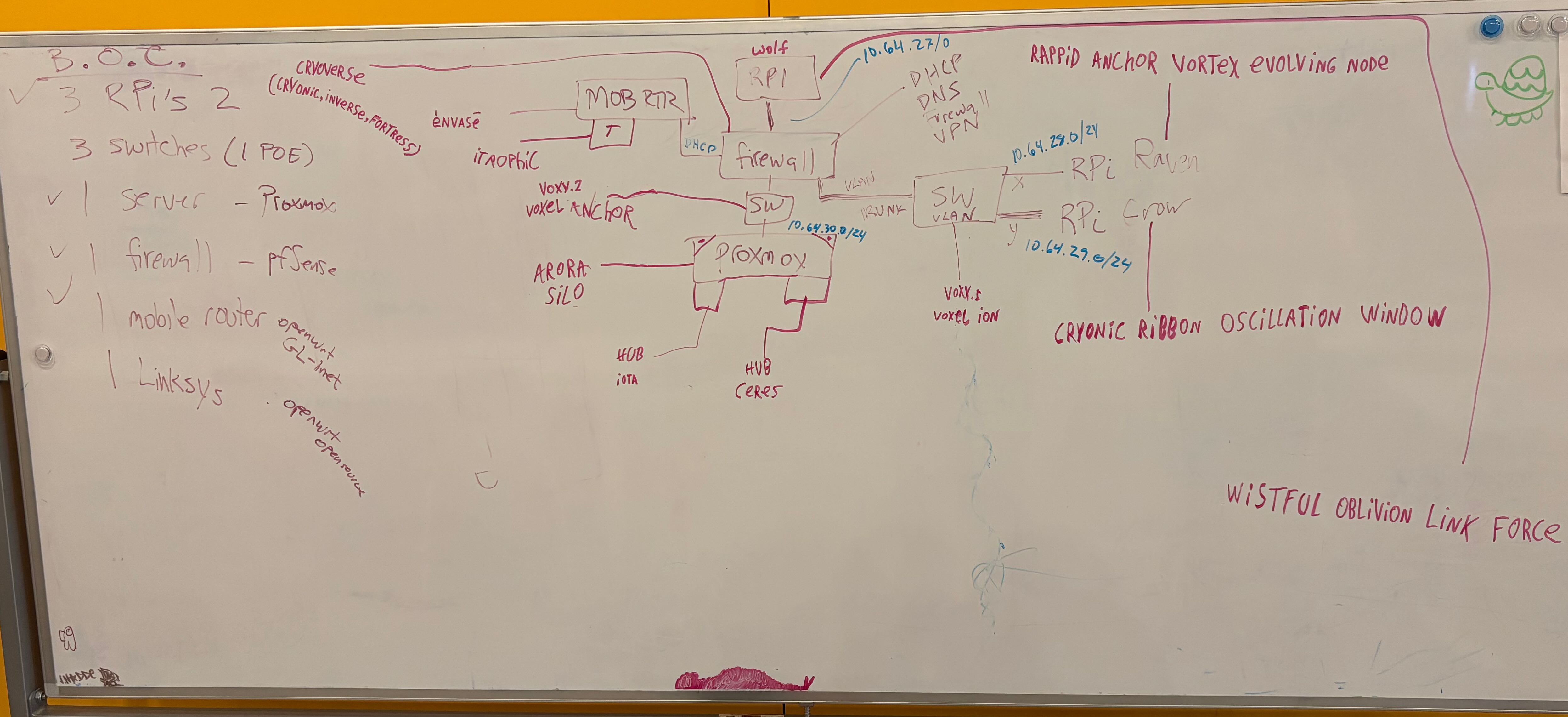
Network diagram of intern software lab

Network Construction Lab
Objective
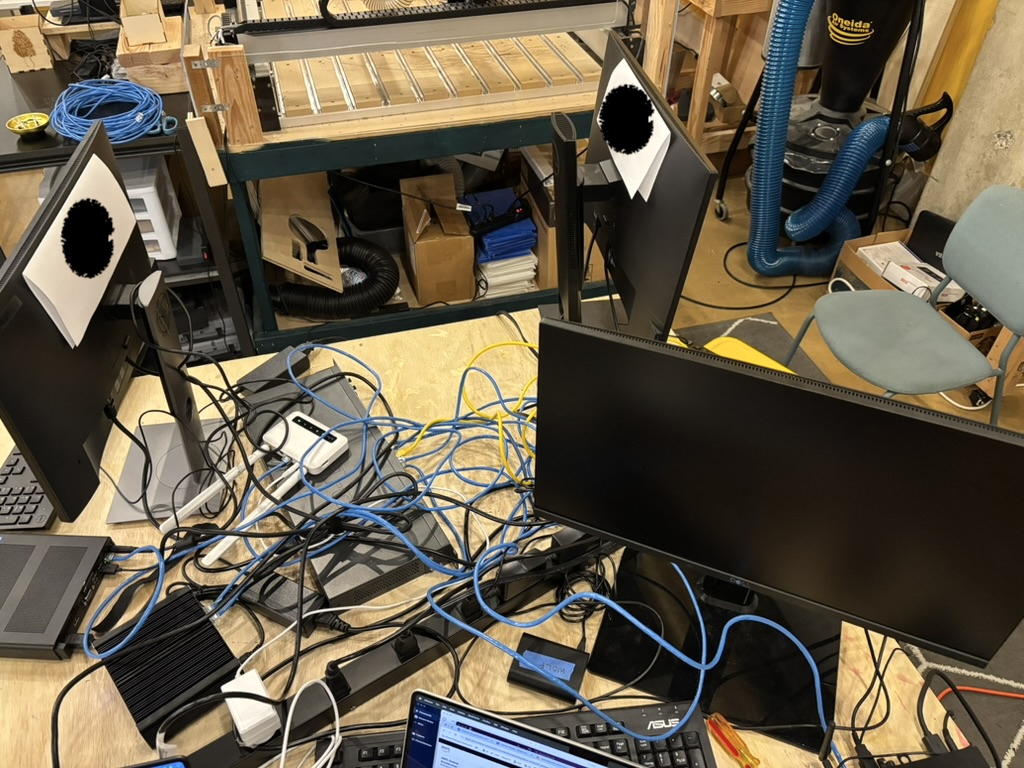
Take a bunch of random bits of hardware (switches, Raspberry Pi computers, and servers) to build out a network from scratch to illustrate what goes into building a network. The project will cover topics like:
- the process of laying out a network
- coming up with names for the devices
- devising an IP addressing scheme
- firewalls
- DNS
- DHCP
- VLAN
- VPN
- virtual machines
- routing
Draft Design
Final Build Photo
Concepts & Terms
Concepts & Terms
During the course of the project, a number of concepts and terms were mentioned in passing that could not be covered in detail because of the very short amount of time available during the Excelerator program. This section is a list of those items along with definitions and/or pointers to further information.
| Term | Definition |
| API | A defined set of commands, data formats, and conventions that let software components interact. APIs hide the internal workings of a system and expose predictable methods for exchanging data—like how apps talk to cloud services or databases. |
| Asymmetric encryption | Uses a pair of cryptographic keys: one public (shared openly) and one private (kept secret). Data encrypted with one key can only be decrypted with the other, enabling secure communication and digital signatures without sharing secrets in advance. |
| Backdoor | An alternate entry point into a computer system that bypasses normal authentication. It may be intentionally added by developers for support or secretly installed by attackers to regain access after compromise. |
| BookStack | BookStack is an open source, opinionated (it has a pre-defined organizational structure based on shelves, books, chapters, and pages) wiki application that you can host on your own server. It is great for collecting documentation and notes, and is the current application that runs the infrastructuresquad.com site. More information available at: https://www.bookstackapp.com |
| Ciphertext | Data transformed by encryption into an unreadable form. It looks random but can be decrypted back to the original message if the correct key is known. |
| Cleartext | Data stored or transmitted without encryption. Anyone with access to the data stream can read or modify it. |
| Containers: OS vs Docker | OS containers isolate applications within a single kernel using features like namespaces and cgroups. Docker adds tooling, packaging, and a registry system that make containers portable and easy to deploy across different environments. |
| DDOS (Distributed Denial of Service) | An attack in which many computers flood a target with traffic or requests to exhaust its resources, making websites or services unreachable. |
| DHCP (Dynamic Host Configuration Protocol) | Automatically assigns IP addresses and other network settings (like gateway and DNS) to devices joining a network. This avoids the need for manual configuration. |
| DNS (Domain Name System) | A hierarchical naming system that translates human-readable domain names (like example.com) into IP addresses used by computers to locate servers. |
| ICMP (Internet Control Message Protocol) | A support protocol used by routers and hosts to send diagnostic or error messages. Tools like ping and traceroute rely on ICMP. |
| IP spoofing | Falsifying the source IP address in a packet’s header to disguise the sender’s identity or impersonate another system, often used in attacks. |
| Linksys | A common consumer networking brand owned by Belkin, known for home routers, switches, and access points. |
| Mobile router ("mob rtr" on network design whiteboard) | A router that provides Internet connectivity via a cellular modem (LTE/5G) and shares that link to local devices over Ethernet or Wi-Fi. Used in vehicles or remote setups. |
| n8n | A self-hosted workflow automation platform that connects APIs and services through drag-and-drop logic, similar to Zapier but open source. |
| netcat (nc) | A versatile networking utility for reading and writing data across TCP or UDP connections. Used for testing ports, transferring files, and building simple servers or backdoors. |
| NTP (Network Time Protocol) | Synchronizes system clocks over the Internet to within milliseconds of global reference time sources. Essential for logs, authentication, and security systems. |
| OpenVPN | An open-source VPN framework that uses SSL/TLS encryption to create secure tunnels between clients and servers, protecting network traffic from interception. |
| Packet sniffing | The act of capturing network packets for analysis. Legitimate for troubleshooting or intrusion detection; malicious when used to intercept credentials or private data. We did demos of tcpdump and WireShark. |
| Pastebin | A web service for sharing text or code snippets publicly. Attackers sometimes use it to post stolen data or command instructions. |
| Phishing | A social engineering attack that uses fake messages or websites to trick users into revealing credentials or installing malware. |
| ping | Sends ICMP echo requests to test network reachability and measure latency. A quick way to confirm if a host is alive. |
| Proxmox | An open-source virtualization platform that manages virtual machines, containers, and storage through a web interface. Often used for home labs or small data centers. |
| Proxy (forward & reverse) | A forward proxy acts on behalf of clients to access external resources (for privacy or caching). A reverse proxy sits in front of servers, handling requests and routing them to internal services (for load balancing or security). |
| REST (Representational State Transfer) | An architectural style for designing web APIs. It treats data as resources identified by URLs and manipulated using standard HTTP verbs (GET, POST, PUT, DELETE). |
| RPi (Raspberry Pi) | A credit-card-sized computer that runs Linux, used for education, prototyping, and IoT. It exposes GPIO pins for hardware projects. |
| Sawing off your tree branch | An idiom describing self-inflicted outages—such as cutting off your own remote access by misconfiguring a firewall or deleting critical permissions. |
| SIEM (Security Information and Event Management) | Centralizes and correlates logs from many systems to detect suspicious activity and generate security alerts. |
| SQL (Structured Query Language) | A domain-specific language used to manage and query relational databases through operations like SELECT, INSERT, UPDATE, and DELETE. |
| SQLite | A small, self-contained SQL database stored in a single file. Common in mobile apps, IoT, and lightweight servers. |
| ssh (Secure Shell) | A cryptographic network protocol for securely accessing and managing remote systems. Replaces insecure tools like telnet and rsh. |
| Switch ("sw" on network design whiteboard) | A Layer 2 device that forwards Ethernet frames between devices on the same network based on MAC addresses, enabling efficient local communication. |
| Symmetric encryption | Uses one shared key for both encryption and decryption. Fast and efficient, but requires secure key exchange between parties. |
| Syncthing | A peer-to-peer file synchronization tool that keeps folders consistent across devices without centralized cloud storage, using encrypted connections. |
| Tailscale | A mesh VPN built on WireGuard that automatically connects devices under a single private network, using identity-based access control. |
| tcpdump | A command-line tool for capturing and analyzing network traffic at the packet level. Often used for diagnostics or security auditing. |
| telnet | An early remote terminal protocol that transmits data in plaintext. Deprecated due to lack of encryption but still useful for simple network tests. |
| traceroute, mtr | Utilities that map the path packets take through routers to a destination. mtr combines ping and traceroute into a continuous, real-time view. |
| TTL (Time To Live) | A counter in IP packets that limits their lifespan. Each router reduces it by one to prevent loops and stale data. DNS records also have a TTL field on each record, which limits the amount of time that a resolver can cache the response. |
| Tunnel | Encapsulates one network protocol inside another, often encrypted, to securely pass private data through public networks. |
| URL / URI (Uniform Resource Locator / Identifier) | A URI identifies a resource; a URL specifies where to find it. Example: https://example.com/file.txt is both a URI and a URL. |
| Virtual machine (VM) | A commercial OpenVPN client with advanced configuration management, used for secure remote access. |
| VLAN (Virtual Local Area Network) | Logically segments a physical network into separate broadcast domains, improving security and organization without extra hardware. |
| WireGuard | A modern, high-performance VPN protocol using state-of-the-art cryptography. Simpler and faster than IPsec or OpenVPN. |
| Wireshark | A GUI packet analyzer that decodes thousands of protocols, letting users inspect network conversations in detail. |
| Yubikey | A hardware security token that stores cryptographic keys and provides strong two-factor authentication for logins and encryption systems. |